Comparisons
Plastic vs VinylBox: record collection apps compared
Plastic is a collection app for vinyl, CDs and cassettes on iPhone and Android. It combines scanning with album stories, track previews and ways to explore your shelf. VinylBox is a Discogs client for managing a collection and marketplace listings.
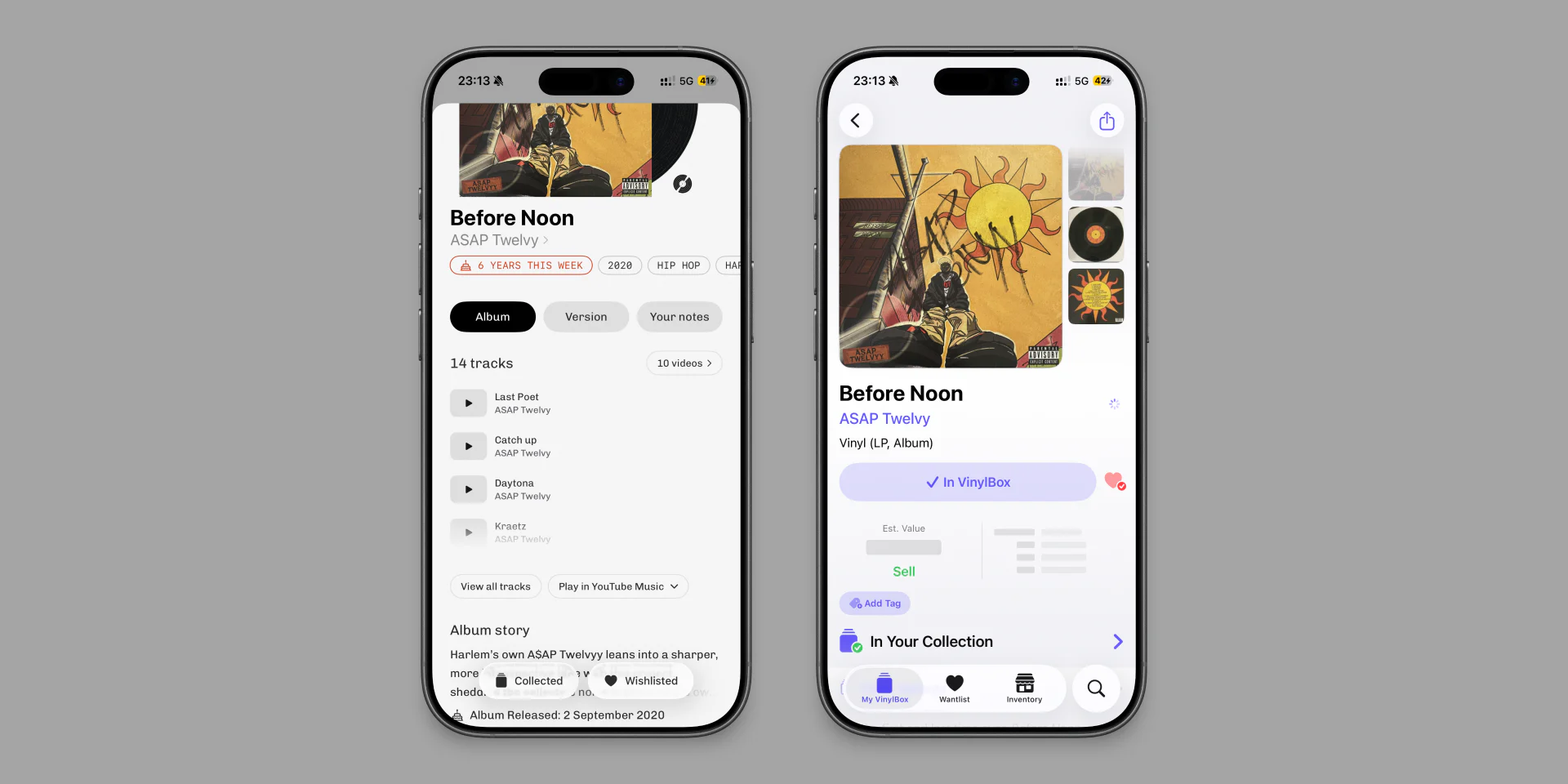
Plastic lets you scan an unfamiliar sleeve, hear a track and save the record for later. VinylBox also handles collection browsing and playback. Its Discogs selling tools matter if you need to manage listings and orders in the same app.
Plastic publishes this comparison. VinylBox details were checked against its App Store listing on 4 September 2026.
How do Plastic and VinylBox compare?
| Plastic | VinylBox | |
|---|---|---|
| Focus | Listening, album context, collection browsing and discovery | Discogs collection and marketplace management |
| Adding records | Cover and barcode scanning, saved-photo import, Multi Scan for up to 10 covers on iPhone, catalogue search and typed dead-wax search | Cover, barcode and Discogs-based search |
| Formats | Vinyl, CDs and cassettes in one collection | Vinyl, CDs and cassettes |
| Album experience | Album Story, tracklist, audio previews, music videos, pressing details, photos and identifiers | Discogs release and marketplace information |
| Listening | Available track previews and music videos, plus album links to streaming services | In-app playback and Apple Music integration |
| Choosing a pressing | Photos, country, year, label, catalogue number, colour and runout text | Runouts, identifiers and filters for scan results |
| Library navigation | Pinch between grid sizes, swipe through albums in the current browse order and zoom into pressing photos | Discogs collection and wantlist views |
| Sorting | Artist first name or surname, album title, date added or the album's original release year | Discogs collection sorting and filters |
| Discogs | Optional. Collection and wishlist sync is free on every account | Collection management connects to Discogs |
| Personal fields | On iPhone, reorder fields and choose which ones appear. Hidden values stay saved | Discogs copy details |
| Wishlist | Different pressings of one album stack into one card | Discogs Wantlist |
| Returning and sharing | Album anniversaries, Monthly Rewind, shareable grids and short videos | Collection and price widgets |
| Discovery | Radar of new releases shaped by your collection, artist pages and editorial Deep Dives into genres | Discogs artist and release information |
| Selling | No marketplace. Opens the relevant Discogs listing | Creates and manages Discogs Marketplace listings and orders |
| Platforms | iPhone and Android | iPhone, iPad, Mac and Apple Vision |
What do album pages show in Plastic?
An album has a musical history and a physical edition. Plastic gives each its own space. The main album tab holds the story and tracklist. The Version tab holds the pressing details, photos and identifiers.
You can play available track previews, switch the tracklist to music videos or open the album in a streaming service. Pressing photos open full screen and can be zoomed to inspect small label details.
Preview and video availability depends on the album and the music providers. A track without a preview still appears in the tracklist.
How do you browse a collection in Plastic?
Pinch the collection to change the cover grid size. Open an album and swipe through the folder, list or search results you came from. Sort artists by first name or surname. Sorting by original release year puts the music in order, even if your copies are later reissues.
Wishlist versions do not have to fill the screen with repeated covers. Different pressings of one album stack into one card, where you can open and compare them.
How does Plastic help you return to older records?
Album anniversaries give you a reason to pull out an older record. Monthly Rewind gathers the records you added that month into a cover grid or short video to share. For something new, Radar suggests releases connected to artists, styles and genres in your collection. Deep Dives explore a genre through its history and records.
How does Plastic work with Discogs?
Plastic is free for cataloguing and managing collections of up to 20 records, with no subscription required. Text search and Discogs sync are free. New accounts receive five starter camera scans; optional Pro adds unlimited scanning and full collection browsing beyond 20 records. You can also use Plastic without connecting Discogs.
Connecting an account brings over your collection, wantlist, folders and custom fields. Changes to linked records then sync both ways. Condition and purchase price sync when matching Discogs fields exist. You can choose which personal fields appear in Plastic, and reorder them on iPhone. Hidden values stay saved.
VinylBox uses a connected Discogs account for collection management.
Read how Plastic works with Discogs.
How does adding records differ?
Both apps offer cover and barcode scanning. In Plastic, open the result to see the music alongside its release details.
Plastic can scan with the camera or import a saved photo or screenshot. On iPhone, Multi Scan handles up to 10 covers in one run. There is also a text catalogue search backed by Discogs data and a separate typed search for dead wax.
Readable label text or a catalogue number in the photo can help Plastic narrow the result. It also identifies the format, so a CD scan leads to CD versions. The version picker includes pressing photos and identifiers for comparison.
Plastic can identify specific pressings through barcode scans and direct release matches. When several editions share the same barcode or artwork, its version picker helps you select your copy using label photos, catalogue numbers, colour and runout details.
For vinyl, you can also open Dead wax search and type a matrix number or another readable part of the runout. Plastic searches recorded inscriptions for that text. This is a typed search, not a photo scan.
Read how vinyl matrix number lookup works.For records with a barcode, the vinyl barcode scanner guide explains release matches and how to choose between editions that share a code.
Which one should you choose?
Choose Plastic if you want your collection app to help with listening as well as cataloguing. Its album stories, previews, collection browsing and discovery features work together around the records you keep.
Consider VinylBox if you also need to create Discogs Marketplace listings and manage orders inside the app.
Plastic is available on iPhone and Android. The VinylBox app compared here is by Daven Gomes and is listed for iPhone, iPad, compatible Macs and Apple Vision.
Plastic has no marketplace. Its pressing details can open current Discogs listings. The vinyl value guide explains why an asking price is not the same as a sale price.
Common questions
Does Plastic need a Discogs account?
No. You can build a collection directly in Plastic. Connecting Discogs adds two-way synchronization on every account, including the free one.
Does Plastic sync custom fields with Discogs?
Yes. Plastic syncs mapped Discogs collection fields. You can choose which fields appear in Plastic, and reorder them on iPhone.
How can I browse my collection in Plastic?
You can pinch between grid sizes, sort by surname or original release year, and swipe through albums without closing the album page.
How does Plastic help identify the right pressing?
Plastic can identify specific pressings through barcode scans and direct release matches. When several editions share the same barcode or artwork, its version picker helps you select your copy using label photos, catalogue numbers, colour and runout details. Typed Dead wax search offers another route through the inscription on the record.
Can I sell records through Plastic?
No. Plastic has no marketplace. It can open the relevant Discogs listing.
Is Plastic available on Android?
Yes. Plastic is available on Android as well as iPhone.
Does Plastic support CDs and cassettes?
Yes. Plastic identifies vinyl, CDs and cassettes and keeps all three formats in one collection.